
Did you know that you can post your direct deposit early through online banking? Now you can!
To post your direct deposit early, log into It’s Me 247 Online Banking as you normally would. If you have a pending direct deposit that qualifies for early direct deposit, you will see it when you log into mobile banking:

You can click on the “Not Now” option to dismiss this message, or click on the orange “Review” option to review your pending direct deposits. Clicking on “Review” will take you to a screen like this:
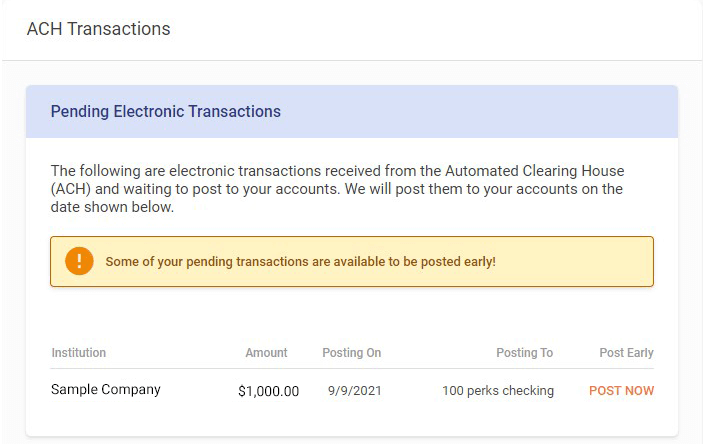
Any qualifying direct deposits will be listed. To post a direct deposit, click on the orange POST NOW option next to the direct deposit. You will be taken to a screen like this:
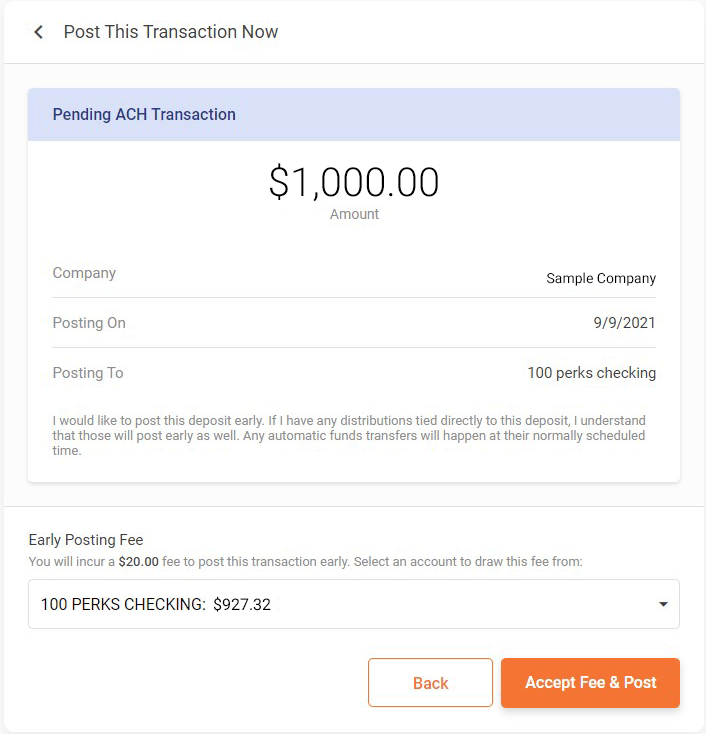
On this screen, you will review the details and make sure everything is correct. At the bottom, you have the option to select from which account the $20.00 early direct deposit will be drawn. Click “Back” if you want to go back to the previous screen or click on the orange “Accept Fee & Post” to post the direct deposit. You are done!
NOTE: You can post your direct deposit even if you don’t have the $20.00 available in your accounts. Contact us at 910-222-1500 so that we can post the direct deposit for you and process the fee.